Custom Radio Button & Custom Checkbox
In previous post “Custom Button” we know how to customize a default Button of Android.
Similarly, in this post, I will show you the way to customize default Radio Button and Checkbox using XML file and desired images.
Copy these images to res/drawable folder:


Define an XML file to specify desired appearance for each state of Radio Button:
{% highlight java %}
Declare Radio Buttons in main activity layout:
{% highlight java %}
    <RadioButton android:id="@+id/radDefault"
    android:layout_width="wrap_content"
    android:layout_height="wrap_content"
    android:text="This is the default radio button"
    android:checked="true"/>

    <RadioButton android:id="@+id/radCustom"
    android:layout_width="wrap_content"
    android:layout_height="wrap_content"
    android:text="This is the custom radio button"
android:button="@drawable/custom_radio_button"/>Remember to assign button attribute to the XML file we defined before.
Do the similar steps with Checkboxes:
Firstly is custom images:


XML file:
{% highlight java %}
Assign value to Checkbox button attribute:
{% highlight java %}
And the result is so … fabulous:
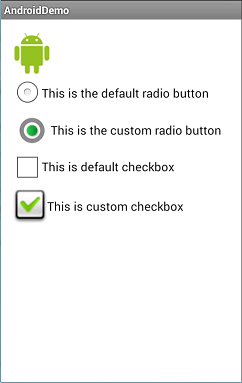
Source code:
https://drive.google.com/file/d/0BzvV1wN-WHWwaW1NLTVMZGl1X2M/edit?usp=sharing