2D Graphics using Multi-threading
A - Introduction Multi-threading
To a game developer, Multi-threading is a must-know term.Multi-threading is used when your application needs to do a lot tasks parallely. By this way, all the tasks will run parallely and don’t have to wait for the others finished.
B - 2D Graphics using Multi-threading Demo description
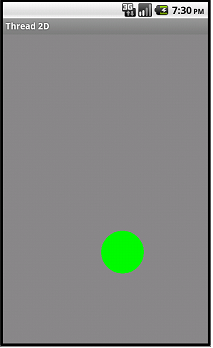
The application will draw a moving green ball on the screen.When user tap on the ball when it’s moving, It’ll stop and vice versa.
In this demo, there’re 2 thread run parallely:
- One will calculate the position and draw to canvas
- One will detect the tap event and handle it
C - Demo implementation
Firstly, create GameView class:- Extends from SurfaceView class
- Implements SurfaceHolder.Callback method
- Override all the methods surfaceChanged(), surfaceCreated(), surfaceDestroyed()
- Override onTouchEvent() method to "catch" the event then call the doTouch() method of GameThread to handle it.
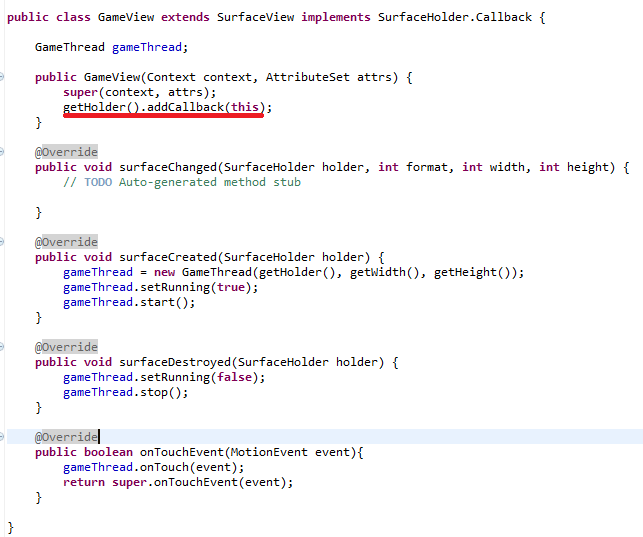
As you can see, GameView is the screen where the “green ball” moving. GameView will also catch all the user interactions event.
Hence, we cannot let the GameView take responsibility for calculating and drawing the green ball —> We need to create a new Thread to handle it!
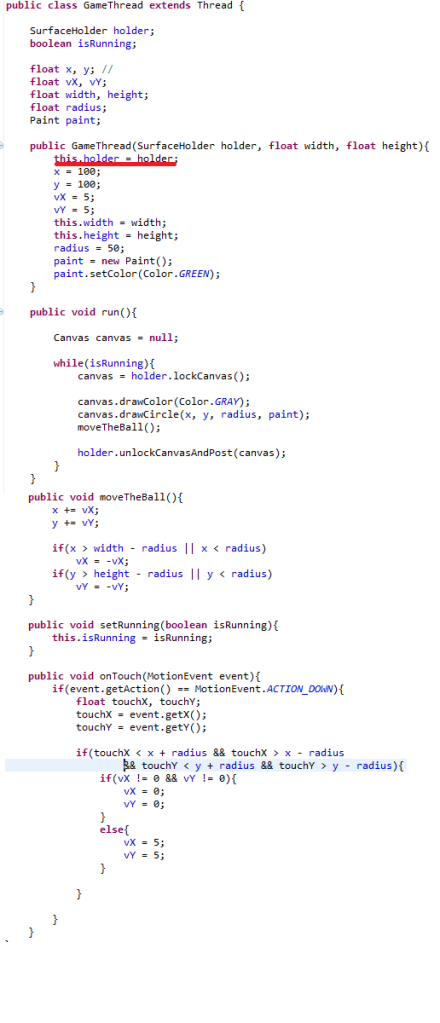
Create GameThread class:
- Extends Thread.
- private SurfaceHolder holder : this variable reference to GameView, used to display the green ball.
- run(): used to draw the green ball on the GameView.
- doTouch(): do some logical calculation when user touch the ball.
Finally, in MainActivity, call setContentView(new GameView(this, null))
Enjoy the result: