Xcode Error: 'No such module' when using CocoaPods
So, I’m pretty new to iOS development and CocoaPods, and today I ran into this super annoying issue. I opened my Xcode project, hit build, and bam:
No such module 'Swinject'This made no sense because I’d already run pod install, and everything looked fine.
Like anyone else, I hit up Stack Overflow and tried all the usual advice:
- Clean the build folder.
- Run
pod deintegrateand reinstall. - Clear the CocoaPods cache.
- Sacrifice a coffee to the debugging gods.
None of it worked.
But then, buried in one thread, I found a random answer (not even the accepted one, seriously?). It sounded simple enough, so I gave it a try—and it actually worked.
Turn out, the issue was that the Pods framework wasn’t being built before my project. Here’s how I fixed it:
-
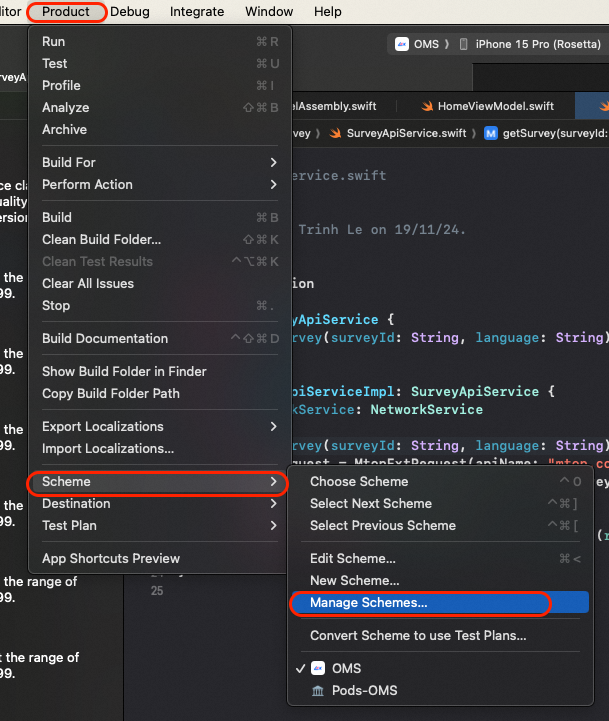
Add Pods to Your Schemes:
- Go to
Product>Scheme>Manage Schemes.... - In the list, find
Podsand check the box next to it.
- Go to
-
Select the Pods Scheme:
- At the top of Xcode, where you select your project’s scheme, switch to
Pods.
- At the top of Xcode, where you select your project’s scheme, switch to
-
Build the Pods Framework:
- Build the
Podsscheme.
- Build the
-
Switch Back and Build Your Project:
- Change back to your project’s scheme.
- Build and run like you normally would.
And just like that, the error was gone.
Sometimes the fix isn’t about doing anything fancy—it’s just about making sure things get built in the right order. If you’re stuck with the “No such module” error, try this before going down the rabbit hole of clearing caches and reinstalling everything.
Hopefully, this saves you the time I wasted! Let me know if it works for you or if you’ve got other tricks to deal with this issue. Good luck!